European Figma Alternatives
A curated collection of the 6 best European alternatives to Figma.
The best European alternative to Figma is Framer. If that doesn't suit you, we've compiled a ranked list of other European Figma alternatives to help you find a suitable replacement. Other interesting alternatives to Figma are: Sketch, Kittl, Penpot, and Viva Systems.
Figma alternatives are mainly Design & Creative Software but may also be CMS & Website Builders. Browse these if you want a narrower list of alternatives or looking for a specific functionality of Figma.
This list contains services from companies headquartered, including any parent companies, in the European Union (EU), the European Economic Area (EEA), the European Free Trade Association (EFTA), the United Kingdom, an EU candidate country, or a European microstate. Russia and Belarus are excluded. You can read more about the listing conditions here.

Written by Piotr Kulpinski

Figma


Design and launch professional, custom websites with total creative freedom. Features powerful CMS, built-in SEO, live collaboration, and one-click publishing. No code.

Create professional websites without writing any code using this intuitive builder, a favorite among designers and high-performing teams. Experience complete design freedom on an infinite canvas equipped with modern layout tools, advanced styling options, and sophisticated typography features. Bring your static designs to life with engaging animations and work alongside your team in real-time on a shared canvas.
Key advantages include:
- True Design Canvas: More than just a visual HTML editor, it offers genuine creative control.
- Flexible Content Management: Develop a CMS that perfectly suits your content and team workflows.
- Built-in SEO & Performance: Achieve high search rankings and fast loading speeds out-of-the-box.
- Effortless Publishing: Go live worldwide with a single click.
- Live Collaboration: Enhance teamwork with simultaneous editing and feedback.
- Responsive Breakpoints: Ensure your site looks perfect on desktop, tablet, and mobile devices.
- Extensibility: Start fast with templates and add more power with plugins.
Build and launch fully custom, high-performing websites that truly stand out.

Create stunning designs and interactive prototypes with a focused macOS toolkit. Collaborate effectively with your team and offer seamless handoff for developers.

Sketch is a dedicated macOS toolkit, requiring macOS Ventura (13.0.0) or newer, made by designers, for designers, putting the focus squarely on your creative process. It offers an intuitive interface and an infinite Canvas for distraction-free design.
Key benefits include:
- Powerful Design Tools: Master vector editing, utilize hundreds of free templates and Artboard presets, and work offline anytime. Features like easy multi-layer renaming, a Canvas Minimap, Command Bar, and scalable components enhance your workflow.
- Rapid Prototyping: Quickly bring your ideas to life. Create realistic prototypes in moments with Smart Animate for fluid UI movements, Overlays for modals and panels, diverse interaction types (hover, press, drag, swipe), and multi-directional scroll areas. Test your prototypes on any web browser, iPhone, or iPad.
- Seamless Collaboration: Share designs and prototypes easily with clients and team members who can view them in their browser. Gather feedback with pinned comments and threads. Utilize a shared Workspace for all your team’s files, libraries, and drafts. Invite developers for free handoff tools, allowing them to inspect files, download assets, and export tokens. Enjoy fair pricing without extra costs for guest editors who already use the software.


Create professional branding and product visuals with AI image generation, pro editing tools, mockups, and curated assets. Free to start with no credit card required.

Kittl is an AI-first design platform that combines cutting-edge artificial intelligence with professional design tools to help creators, designers, and businesses produce standout branding and product visuals faster than ever before.
Key Features:
- Multiple AI Models: Access to top image generation models including DALL-E 3, Flux 1.1 Pro, Ideogram 2.0A, and more
- Professional Design Tools: Complete suite of editing capabilities with vector support and advanced features
- Instant Mockups: Studio-quality product shots and mockups without the need for expensive photography
- Curated Assets: Over 1 million photos, graphics, fonts, and 100+ million premium assets
- Templates Library: Professional templates from world-class designers for every creative project
Perfect for:
- Designers creating professional product designs and branding
- Sellers needing instant, studio-quality product photography
- Businesses requiring custom imagery and branded content
- Agencies scaling marketing output and visual content creation
The platform offers flexible pricing starting with a free forever plan that includes 5 projects, professional templates, and 200 AI tokens. Pro plans provide unlimited projects, advanced AI features, and expanded asset libraries. Kittl puts designers in control of their creative process, enhancing rather than replacing human creativity with intelligent automation.


Design tool that connects designers and developers seamlessly. Create prototypes, UI designs, and generate code in one platform with no handoff drama.

Penpot revolutionizes the design-to-development workflow by eliminating the traditional handoff process that often leads to miscommunication and delays. This open-source design platform enables designers and developers to work together seamlessly within a single environment.
Key capabilities include:
- Interface design with advanced typography and custom font support
- Interactive prototyping with flows, transitions, and animations
- Real-time collaboration keeping all stakeholders engaged throughout the process
- Code inspection providing CSS, HTML, and SVG markup specifications
- Native web standards expressing designs directly as CSS, SVG, and HTML
What sets Penpot apart is its developer-friendly approach - designs are automatically expressed as code, making implementation faster and more accurate. The platform supports flexible integration through APIs and webhooks, allowing teams to connect with existing development toolchains.
As a fully open-source solution, Penpot ensures complete ownership of your work and tools, regardless of team size or project scope. The platform also supports custom plugins for enhanced functionality and workflow customization.
Trusted by thousands of organizations worldwide, Penpot has earned praise for its intuitive controls that map directly to CSS mental models, making the transition from design to development remarkably smooth.

Free InDesign alternative with AI features for design, layout, and publishing. Works on Windows, macOS, Linux, and web browsers with team collaboration tools.
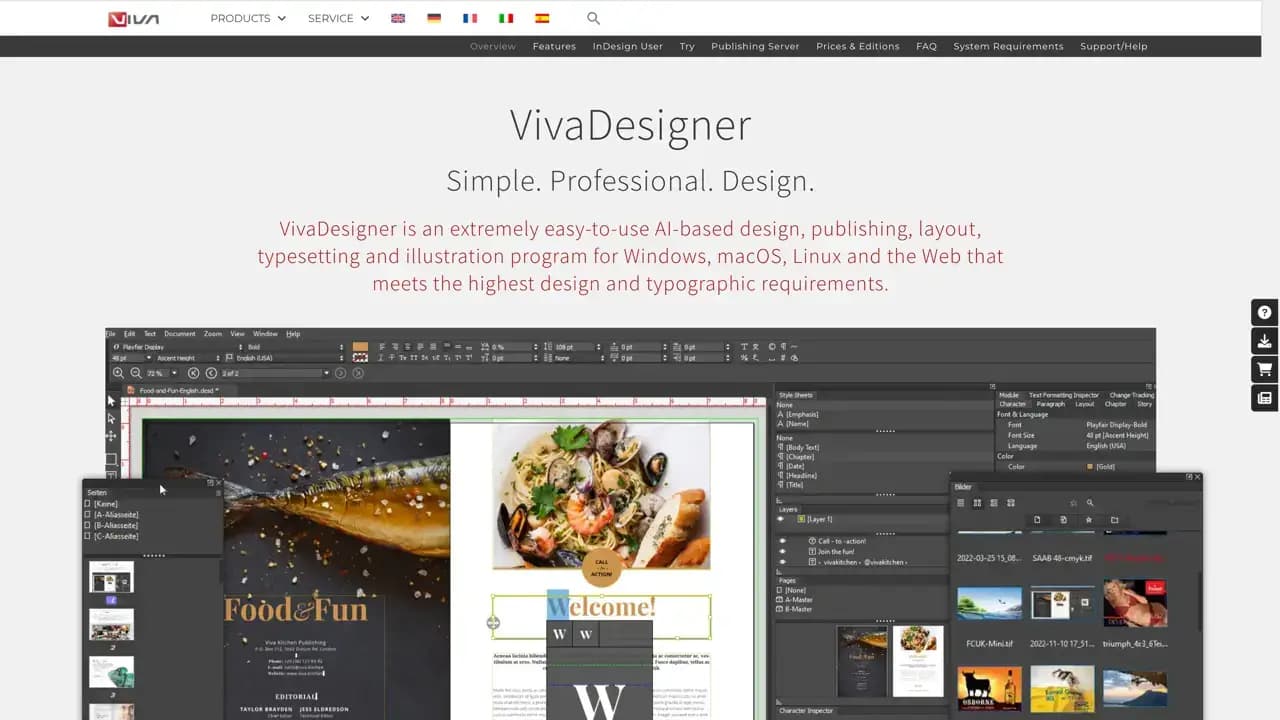
VIVA offers a comprehensive suite of creative publishing solutions, with VivaDesigner as their flagship product - a free, AI-powered alternative to Adobe InDesign. The software supports Windows, macOS, Linux, and web browsers, making it accessible across all major platforms.
Key AI-powered features include:
- Background removal and blurring for images
- Text analysis, rephrasing, and translation into 30+ languages
- Automatic keyword generation and text summarization
- Image extension and enhancement capabilities
- Element removal with intelligent background restoration
The platform excels in team collaboration through VivaCloud, offering an all-in-one web platform for communication, content creation, and publishing. Database Publishing enables full automation of complex design workflows based on custom rules and data sources.
Perfect for InDesign users who want to:
- Edit InDesign documents directly in web browsers
- Avoid subscription fees with lifetime licensing options
- Access enhanced team and workflow features
- Maintain compatibility with existing InDesign files
According to OpenAI's GPT-4o comparison, VivaDesigner scored 93 out of 100 points when evaluated against seven leading layout programs. With over 400 new features in version 11 and millions of downloads worldwide, VIVA has established itself as a reliable alternative for creative professionals seeking powerful, cost-effective design solutions.


Free open-source 2D graphics editor featuring Node Graph workflow. Create vectors, edit photos, design graphics, make pixel art and animate in one app.

PixiEditor is a comprehensive 2D graphics editor that combines multiple creative disciplines into one powerful application. Built with an innovative Node Graph workflow, it offers a non-destructive approach to digital art creation.
The software excels in six core areas: procedural art through Node Graph connections, dedicated pixel art tools with advanced palette management, comprehensive image editing capabilities, flexible drawing tools with custom brush engine, vector graphics creation with snapping features, and frame-by-frame animation tools.
Key advantages include being completely free and open-source, desktop-native performance, cross-platform compatibility, offline functionality, and no AI dependencies. The development team, based in Europe, maintains transparency through an open roadmap driven by community proposals and voting.
User feedback highlights its professional interface and ease of use - even 9-year-olds can create complex pixel art. With 87% positive Steam reviews and 4.4/5 Microsoft Store rating, PixiEditor has proven popular among artists transitioning from expensive alternatives like Photoshop.
The Node Graph system sets it apart by enabling procedural graphics creation, custom shader integration, and advanced brush building. Whether you're creating game sprites, logos, illustrations, or animations, PixiEditor provides professional-grade tools without the professional price tag.
Figma
Find alternatives to

 Oh Dear – EU-hosted, GDPR-compliant uptime monitoring