European Canva Alternatives
A curated collection of the 8 best European alternatives to Canva.
The best European alternative to Canva is Photoroom. If that doesn't suit you, we've compiled a ranked list of other European Canva alternatives to help you find a suitable replacement. Other interesting alternatives to Canva are: Sketch, Excalidraw, Kittl, and Zoner.
Canva alternatives are mainly Design & Creative Software but may also be Video & Screen Recording Tools. Browse these if you want a narrower list of alternatives or looking for a specific functionality of Canva.
This list contains services from companies headquartered, including any parent companies, in the European Union (EU), the European Economic Area (EEA), the European Free Trade Association (EFTA), the United Kingdom, an EU candidate country, or a European microstate. Russia and Belarus are excluded. You can read more about the listing conditions here.

Written by Piotr Kulpinski

Canva


AI-powered photo editing tool for e-commerce businesses. Remove backgrounds, create professional product visuals, and generate marketplace-ready listings at scale.

Transform ordinary product shots into scroll-stopping visuals that drive clicks, trust, and conversions. This comprehensive AI photo studio removes backgrounds with precision, even on transparent products, and generates professional-quality imagery designed specifically for sellers.
Cut photo costs by 90% without sacrificing quality - save thousands of dollars and hundreds of hours with automated editing tools that create visuals converting better than traditional photography. No design skills required to achieve studio-level results.
Key features include:
- Background removal with best-in-class AI precision
- Bulk editing for processing thousands of images efficiently
- AI product staging to create realistic product scenes
- Virtual model generation for lifestyle imagery
- Brand kit integration for consistent, on-brand visuals across teams
- API access for workflow automation
Proven results: 72% CTR uplift and 60% CPA reduction for leading brands. From product listings to social content, ads, and print materials, create everything needed to boost sales and build trust with customers across all marketplaces and platforms.


Create stunning designs and interactive prototypes with a focused macOS toolkit. Collaborate effectively with your team and offer seamless handoff for developers.

Sketch is a dedicated macOS toolkit, requiring macOS Ventura (13.0.0) or newer, made by designers, for designers, putting the focus squarely on your creative process. It offers an intuitive interface and an infinite Canvas for distraction-free design.
Key benefits include:
- Powerful Design Tools: Master vector editing, utilize hundreds of free templates and Artboard presets, and work offline anytime. Features like easy multi-layer renaming, a Canvas Minimap, Command Bar, and scalable components enhance your workflow.
- Rapid Prototyping: Quickly bring your ideas to life. Create realistic prototypes in moments with Smart Animate for fluid UI movements, Overlays for modals and panels, diverse interaction types (hover, press, drag, swipe), and multi-directional scroll areas. Test your prototypes on any web browser, iPhone, or iPad.
- Seamless Collaboration: Share designs and prototypes easily with clients and team members who can view them in their browser. Gather feedback with pinned comments and threads. Utilize a shared Workspace for all your team’s files, libraries, and drafts. Invite developers for free handoff tools, allowing them to inspect files, download assets, and export tokens. Enjoy fair pricing without extra costs for guest editors who already use the software.


Create collaborative diagrams and sketches with a unique hand-drawn style. Perfect for brainstorming, wireframing, and visual collaboration in real-time.

Transform your ideas into visual diagrams with a distinctive hand-drawn aesthetic that makes technical sketches feel more approachable and creative. This collaborative whiteboard tool excels at creating flowcharts, wireframes, system diagrams, and brainstorming sessions that stand out from typical rigid digital drawings.
Key features include:
- Real-time collaboration - Work simultaneously with team members on the same canvas
- Hand-drawn style - Unique sketchy appearance that adds personality to technical diagrams
- Intuitive interface - Simple tools for shapes, arrows, text, and freehand drawing
- Export options - Save your work in multiple formats for presentations and documentation
- No registration required - Start sketching immediately without account setup
Perfect for designers, developers, educators, and teams who want to create engaging visual content that breaks away from sterile corporate aesthetics. Whether you're mapping user flows, explaining complex systems, or facilitating workshops, the hand-drawn style helps make technical concepts more accessible and memorable.

Create professional branding and product visuals with AI image generation, pro editing tools, mockups, and curated assets. Free to start with no credit card required.

Kittl is an AI-first design platform that combines cutting-edge artificial intelligence with professional design tools to help creators, designers, and businesses produce standout branding and product visuals faster than ever before.
Key Features:
- Multiple AI Models: Access to top image generation models including DALL-E 3, Flux 1.1 Pro, Ideogram 2.0A, and more
- Professional Design Tools: Complete suite of editing capabilities with vector support and advanced features
- Instant Mockups: Studio-quality product shots and mockups without the need for expensive photography
- Curated Assets: Over 1 million photos, graphics, fonts, and 100+ million premium assets
- Templates Library: Professional templates from world-class designers for every creative project
Perfect for:
- Designers creating professional product designs and branding
- Sellers needing instant, studio-quality product photography
- Businesses requiring custom imagery and branded content
- Agencies scaling marketing output and visual content creation
The platform offers flexible pricing starting with a free forever plan that includes 5 projects, professional templates, and 200 AI tokens. Pro plans provide unlimited projects, advanced AI features, and expanded asset libraries. Kittl puts designers in control of their creative process, enhancing rather than replacing human creativity with intelligent automation.
Award-winning photo and video editing software with intuitive interface, AI tools, HDR support, and fast RAW processing. Perfect for beginners to professionals.

Award-winning photo and video editing software that combines professional-grade tools with an intuitive interface, making it perfect for photographers of all skill levels. Winner of EISA Photo Software 2025-2026 for Best Photo Software of the Year.
Key features include:
- Lightning-fast RAW editing with batch processing for hundreds of photos
- True HDR support for highest quality editing
- AI-powered tools for automatic enhancement, face detection, and background removal
- Non-destructive editing that preserves original image data
- All-in-one solution for photos and videos - no additional software needed
The software offers exceptional value with professional tools at an affordable price point. Users praise its clear, self-instructive layout and ability to deliver quality results without a steep learning curve. Perfect for documentary photography, studio work, and creative projects.
Comprehensive learning resources include video tutorials, weekly magazine articles, and photography books. The software runs on Windows 10 and 11, with unlimited device installations for subscribers and regular updates twice yearly with new tools and improvements.

Design tool that connects designers and developers seamlessly. Create prototypes, UI designs, and generate code in one platform with no handoff drama.

Penpot revolutionizes the design-to-development workflow by eliminating the traditional handoff process that often leads to miscommunication and delays. This open-source design platform enables designers and developers to work together seamlessly within a single environment.
Key capabilities include:
- Interface design with advanced typography and custom font support
- Interactive prototyping with flows, transitions, and animations
- Real-time collaboration keeping all stakeholders engaged throughout the process
- Code inspection providing CSS, HTML, and SVG markup specifications
- Native web standards expressing designs directly as CSS, SVG, and HTML
What sets Penpot apart is its developer-friendly approach - designs are automatically expressed as code, making implementation faster and more accurate. The platform supports flexible integration through APIs and webhooks, allowing teams to connect with existing development toolchains.
As a fully open-source solution, Penpot ensures complete ownership of your work and tools, regardless of team size or project scope. The platform also supports custom plugins for enhanced functionality and workflow customization.
Trusted by thousands of organizations worldwide, Penpot has earned praise for its intuitive controls that map directly to CSS mental models, making the transition from design to development remarkably smooth.

Free InDesign alternative with AI features for design, layout, and publishing. Works on Windows, macOS, Linux, and web browsers with team collaboration tools.
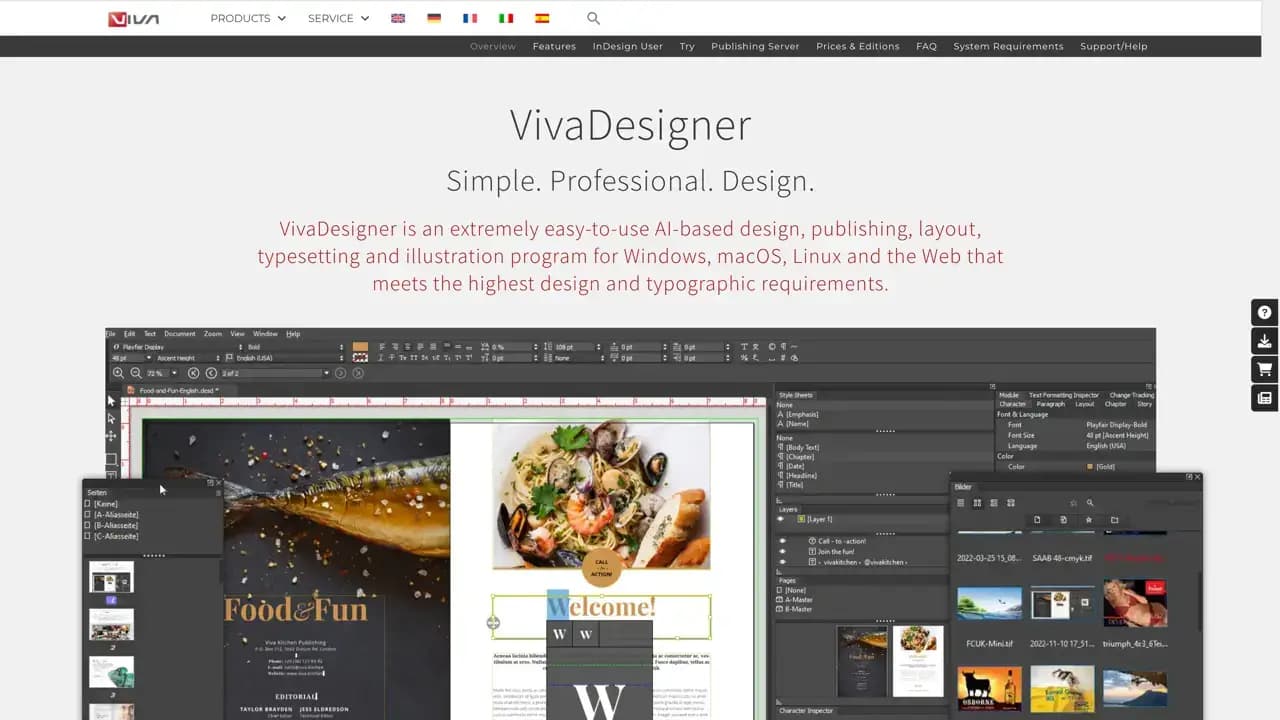
VIVA offers a comprehensive suite of creative publishing solutions, with VivaDesigner as their flagship product - a free, AI-powered alternative to Adobe InDesign. The software supports Windows, macOS, Linux, and web browsers, making it accessible across all major platforms.
Key AI-powered features include:
- Background removal and blurring for images
- Text analysis, rephrasing, and translation into 30+ languages
- Automatic keyword generation and text summarization
- Image extension and enhancement capabilities
- Element removal with intelligent background restoration
The platform excels in team collaboration through VivaCloud, offering an all-in-one web platform for communication, content creation, and publishing. Database Publishing enables full automation of complex design workflows based on custom rules and data sources.
Perfect for InDesign users who want to:
- Edit InDesign documents directly in web browsers
- Avoid subscription fees with lifetime licensing options
- Access enhanced team and workflow features
- Maintain compatibility with existing InDesign files
According to OpenAI's GPT-4o comparison, VivaDesigner scored 93 out of 100 points when evaluated against seven leading layout programs. With over 400 new features in version 11 and millions of downloads worldwide, VIVA has established itself as a reliable alternative for creative professionals seeking powerful, cost-effective design solutions.


Free open-source 2D graphics editor featuring Node Graph workflow. Create vectors, edit photos, design graphics, make pixel art and animate in one app.

PixiEditor is a comprehensive 2D graphics editor that combines multiple creative disciplines into one powerful application. Built with an innovative Node Graph workflow, it offers a non-destructive approach to digital art creation.
The software excels in six core areas: procedural art through Node Graph connections, dedicated pixel art tools with advanced palette management, comprehensive image editing capabilities, flexible drawing tools with custom brush engine, vector graphics creation with snapping features, and frame-by-frame animation tools.
Key advantages include being completely free and open-source, desktop-native performance, cross-platform compatibility, offline functionality, and no AI dependencies. The development team, based in Europe, maintains transparency through an open roadmap driven by community proposals and voting.
User feedback highlights its professional interface and ease of use - even 9-year-olds can create complex pixel art. With 87% positive Steam reviews and 4.4/5 Microsoft Store rating, PixiEditor has proven popular among artists transitioning from expensive alternatives like Photoshop.
The Node Graph system sets it apart by enabling procedural graphics creation, custom shader integration, and advanced brush building. Whether you're creating game sprites, logos, illustrations, or animations, PixiEditor provides professional-grade tools without the professional price tag.
Canva
Find alternatives to

 Proton Unlimited – Your digital life deserves better than US tech.